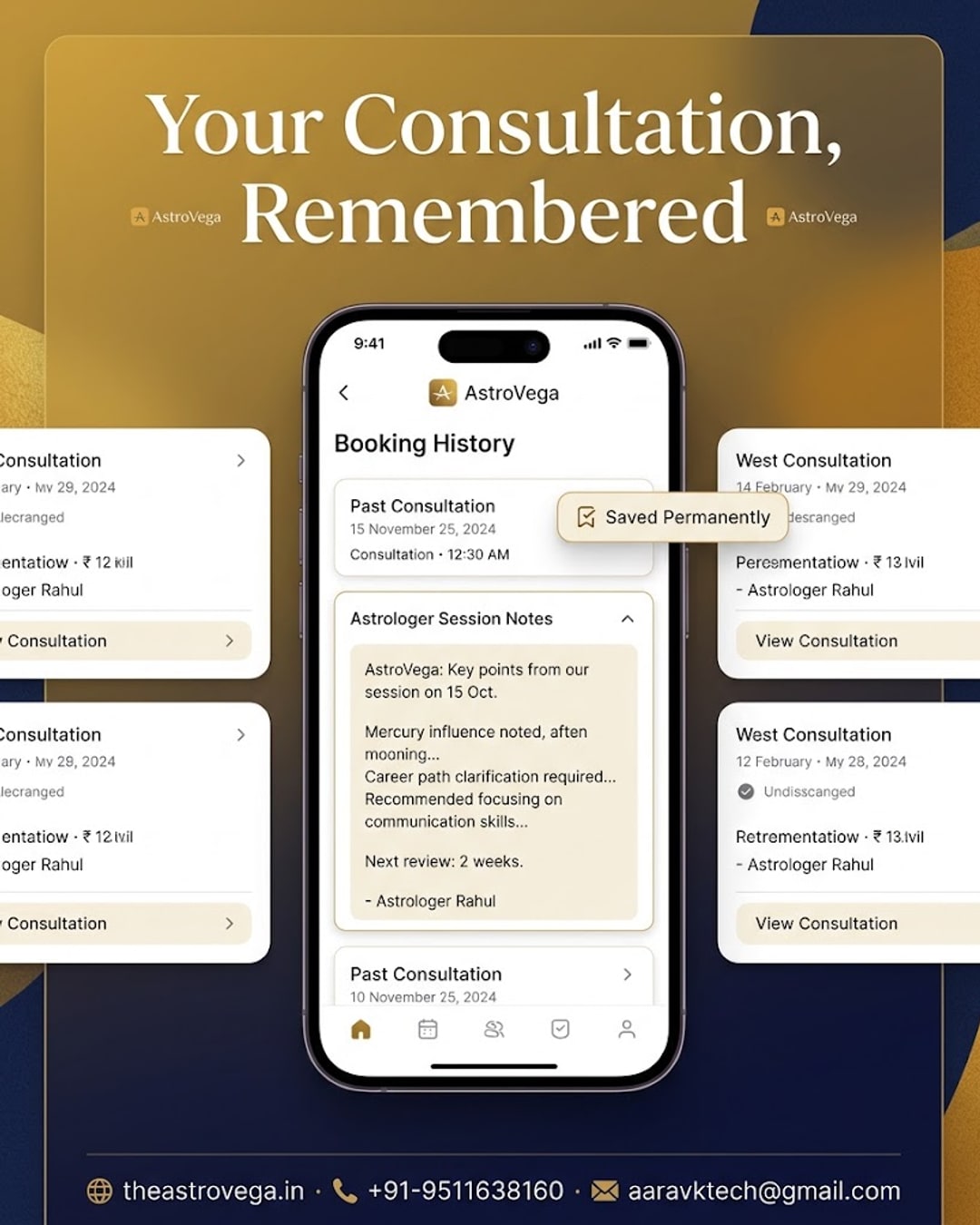
Ever forget half of what your astrologer told you? AstroVega saves your astrologer's written session notes right in your booking history for later.
Why You Keep Forgetting What Your Astrologer Told You (And the Fix)
If you have ever walked out of an astrology consultation feeling clear-headed, only to draw a blank two weeks later when a family member asks what the astrologer actually said, you are not alone. Verbal guidance is easy to lose. This is exactly the gap AstroVega's session notes feature was built to close, and in this post we will look at why it matters and how it works.
The problem with verbal-only consultations
Most astrology consultations, whether offline or over a call, are entirely verbal. You listen, you nod, maybe you jot down a word or two on a random notepad, and then life moves on. A month later, when a decision comes up, you are left trying to reconstruct guidance from memory. This is a common frustration people quietly deal with, and it is rarely talked about compared to bigger issues like pricing or availability.
How AstroVega's session notes actually work
After a consultation booked through AstroVega, the astrologer can add written notes summarizing the key points discussed. These notes are attached directly to that specific booking and saved in your account's booking history. You do not need to ask for them separately or hope the astrologer remembers to email you something. They are simply there, waiting whenever you want to look back.
Who this quietly helps the most
Think about a parent who consulted an astrologer about their child's education timing, or a couple who discussed marriage-related guidance months before the wedding date arrives. In both cases, the useful part of the consultation is not just the conversation itself but being able to return to it later, at the moment a decision actually needs to be made. Session notes turn a one-time conversation into a reference you can come back to.
Session notes versus the Kundli PDF download
It is worth being clear about the difference here. AstroVega also lets you download your Kundli and consultation reports as a PDF, which is great for sharing offline with family. Session notes are different: they are the astrologer's own written summary of what was discussed in that particular consultation, living inside your booking history rather than a separate downloadable file. Together, the two give you both the technical chart data and the human context around it.
Why this builds more trust over time
A consultation that disappears the moment the call ends can feel transactional. One where you can scroll back and reread the guidance, in the astrologer's own words, feels more like an ongoing relationship. That is a small design choice, but it changes how much people trust the guidance they are paying for.
My take
If you are the kind of person who forgets half of what is said in any meeting, appointment or consultation, this is one of those features you will not appreciate until you actually need it. My honest advice: the next time you book a consultation on AstroVega, do not rely on your memory at all. Let the astrologer's notes do that work, and just check your booking history whenever the topic comes up again. It costs you nothing extra and saves you the awkward moment of asking someone to repeat guidance from months ago.
🌐 theastrovega.in · 📞 +91-9511638160 · 📧 aaravktech@gmail.com